<?xml version="1.0" encoding="utf-8"?>
<feed xmlns="http://www.w3.org/2005/Atom">
	<title type="html"><![CDATA[Форум BreezeMe.su &mdash; [Гайд] Как найти "Launcher.log"?]]></title>
	<link rel="self" href="http://forum.breezeme.su/feed/atom/topic/1588/" />
	<updated>2014-08-22T19:18:12Z</updated>
	<generator>PunBB</generator>
	<id>http://forum.breezeme.su/topic/1588/</id>
		<entry>
			<title type="html"><![CDATA[Re: [Гайд] Как найти "Launcher.log"?]]></title>
			<link rel="alternate" href="http://forum.breezeme.su/post/13980/#p13980" />
			<content type="html"><![CDATA[<p>+++ ты спасла моего друга!!!</p>]]></content>
			<author>
				<name><![CDATA[Jericho]]></name>
				<uri>http://forum.breezeme.su/user/722/</uri>
			</author>
			<updated>2014-08-22T19:18:12Z</updated>
			<id>http://forum.breezeme.su/post/13980/#p13980</id>
		</entry>
		<entry>
			<title type="html"><![CDATA[Re: [Гайд] Как найти "Launcher.log"?]]></title>
			<link rel="alternate" href="http://forum.breezeme.su/post/13961/#p13961" />
			<content type="html"><![CDATA[<p>+ <img src="http://forum.breezeme.su/img/smilies/lol.png" width="15" height="15" alt="lol" /></p>]]></content>
			<author>
				<name><![CDATA[Realchik]]></name>
				<uri>http://forum.breezeme.su/user/591/</uri>
			</author>
			<updated>2014-08-22T17:47:31Z</updated>
			<id>http://forum.breezeme.su/post/13961/#p13961</id>
		</entry>
		<entry>
			<title type="html"><![CDATA[Re: [Гайд] Как найти "Launcher.log"?]]></title>
			<link rel="alternate" href="http://forum.breezeme.su/post/13945/#p13945" />
			<content type="html"><![CDATA[<p>+<br />Для новичков полезно,да и тем кто не очень с компьютером ладит будет нужно)</p>]]></content>
			<author>
				<name><![CDATA[Orce]]></name>
				<uri>http://forum.breezeme.su/user/433/</uri>
			</author>
			<updated>2014-08-22T16:24:24Z</updated>
			<id>http://forum.breezeme.su/post/13945/#p13945</id>
		</entry>
		<entry>
			<title type="html"><![CDATA[Re: [Гайд] Как найти "Launcher.log"?]]></title>
			<link rel="alternate" href="http://forum.breezeme.su/post/13943/#p13943" />
			<content type="html"><![CDATA[<p>+ гайду</p>]]></content>
			<author>
				<name><![CDATA[emil1man]]></name>
				<uri>http://forum.breezeme.su/user/590/</uri>
			</author>
			<updated>2014-08-22T16:20:13Z</updated>
			<id>http://forum.breezeme.su/post/13943/#p13943</id>
		</entry>
		<entry>
			<title type="html"><![CDATA[[Гайд] Как найти "Launcher.log"?]]></title>
			<link rel="alternate" href="http://forum.breezeme.su/post/13941/#p13941" />
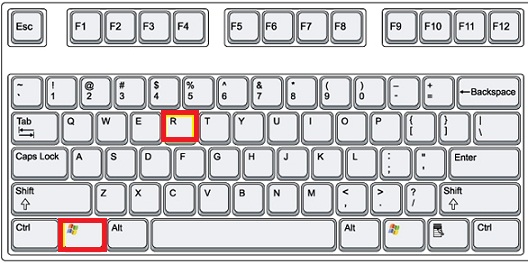
			<content type="html"><![CDATA[<p>1) Использовать комбинацию, показанную ниже на картинке.<br /><span class="postimg"><img src="http://kompcheb.ru/wp-content/uploads/2013/07/win_R.jpg" alt="http://kompcheb.ru/wp-content/uploads/2013/07/win_R.jpg" /></span><br />2) Написать - C:\(Имя компьютера, узнаем через пуск)\Appdata\Roaming\.breezeme_minecraft<br />3) Для облегчения, можно поискать в &quot;Поиске&quot;, а если у вас ПК не очень мощный, ищем вручную.<br />Ищем текстовой документ - launcher.<br />4) Прекрасно! Мы знаем расположение файла!<br />З.Ы.<br />Если у вас показаны скрытые папки, то вы с легкостью сможете найти это все, а если нет - вот вам гайдик:<br />1) Нажимаем &quot;Выберете файл&quot;<br />Тут нам понадобится поиск.<br />2) Пишем - ApplicationData<br />3) Нажимаем на папку<br />4) Находим launcher<br />Вы превосходны!<br />З.Ы. Гайд будет пополнятся и изменятся :З</p>]]></content>
			<author>
				<name><![CDATA[Aleksandra_Fa]]></name>
				<uri>http://forum.breezeme.su/user/33/</uri>
			</author>
			<updated>2014-08-22T16:11:54Z</updated>
			<id>http://forum.breezeme.su/post/13941/#p13941</id>
		</entry>
</feed>